Frequently Asked Questions
Pick a site area from the navigation, or find a common question below.
Under the
Subscription tab in My Account, you will see your options for upgrading from your current subscription. If you choose to upgrade your monthly subscription to annual (or upgrade to a team account), the amount is prorated based on your subscription`s remaining time.
You can change your password by entering your account email on the
Password Recovery page.
You can change your email, password, and name through the
Settings tab in My Account.
You can cancel your Master.dev subscription by visiting the Subscription tab in your My Account area.
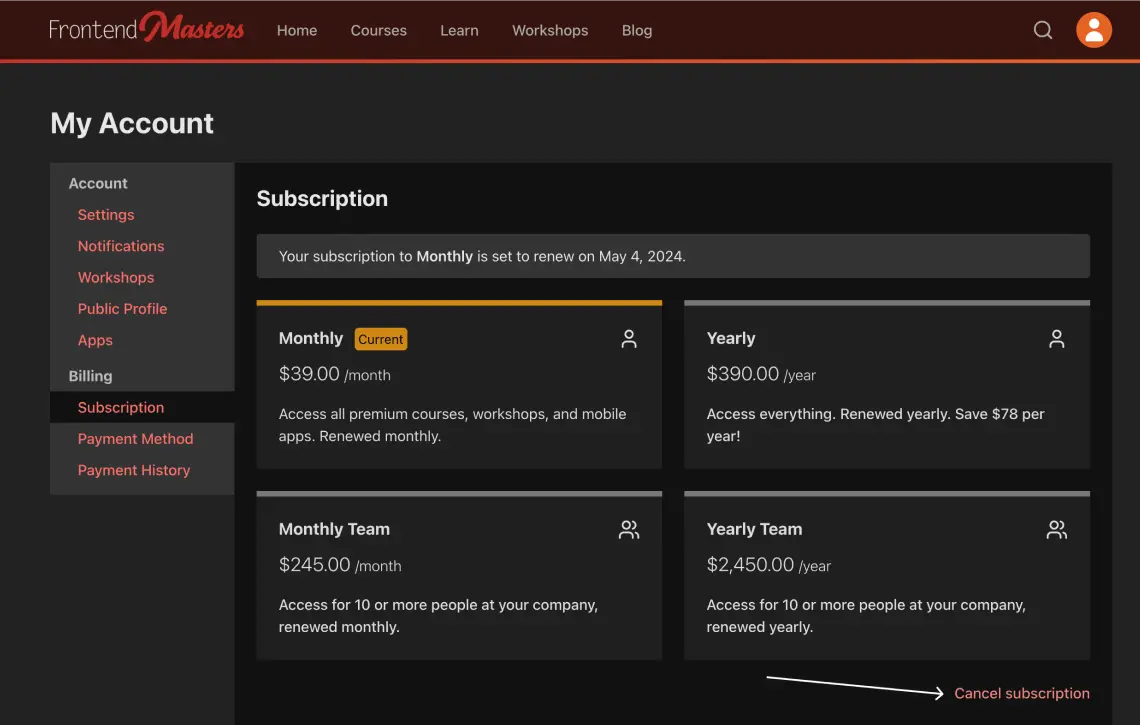
You can turn off auto-renew by canceling your subscription through the
Subscription tab in My Account. After you cancel, you will have access to courses until your subscription expiration, and your subscription will no longer auto-renew.
You can delete your account from the
Settings page in My Account. This is permanent and cannot be undone. Your data will be removed from all of our systems, and if you have an active subscription, it will be canceled.
Still need help? support@master.dev